


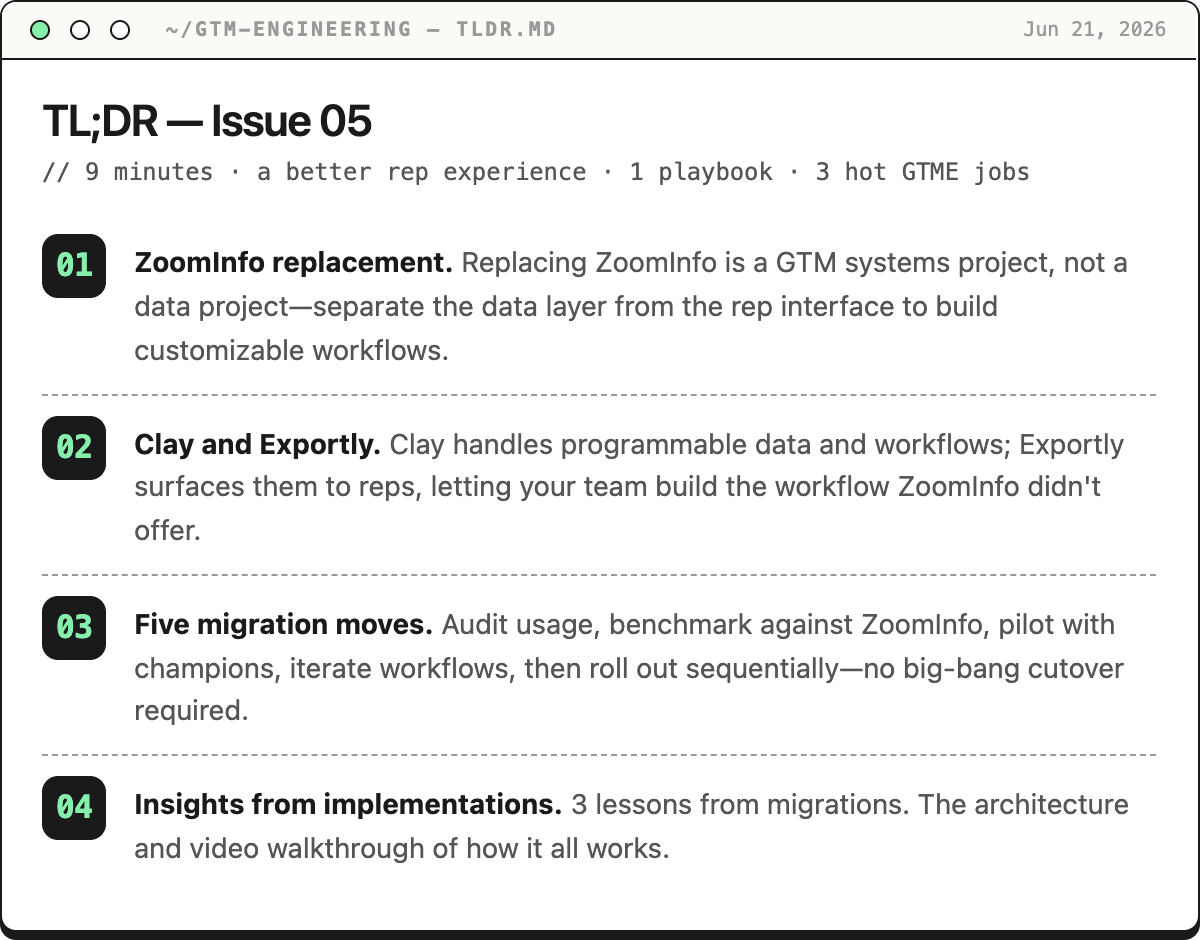
For a long time, ZoomInfo was considered the gold standard data provider.
Then Clay pioneered GTM Engineering and the data marketplace.
Now most companies want to adopt Clay’s GTM Infrastructure without sacrificing an experience reps are used to.
One question always comes up… “how do we replace the rep experience of ZoomInfo since Clay isn’t designed for reps?”
This is where Exportly.ai comes in and why I’m excited to host it’s Founder, Elliot O’Connor, for this guest post. Exportly.ai is the most intelligent chrome extension for reps specifically designed to work with Clay. This is how to build a more powerful prospecting system for your reps and why a $20B company just moved a $1M+ ZoomInfo contract over to the tech duo.
Migrating off ZoomInfo
Replacing ZoomInfo is not a data project.
It is a GTM systems project.
The mistake: looking for another ZoomInfo
Most replacement projects start the same way. A renewal comes up. The team makes a spreadsheet. ZoomInfo goes in column A. Apollo, Cognism, Lusha, LeadIQ, and a few others go in the next columns. Then everyone compares database coverage, seat cost, and contract terms.
That can be useful, but it misses the bigger shift.

ZoomInfo is a vertically integrated sales data product. It owns the data, the interface, the integration paths, and the user experience. That is why it feels easy to reps. They open LinkedIn, click a button, reveal a phone number, and push a contact.
It is also why the contract can feel bigger than the use case. Many teams bought a platform, but the behavior that actually renews every day is much narrower:
Search. Reveal. Enrich. Export. Sequence.
Clay and Exportly split that system into two layers:
Clay is the programmable data and workflow layer.
Exportly is the rep-facing interface for those Clay workflows.
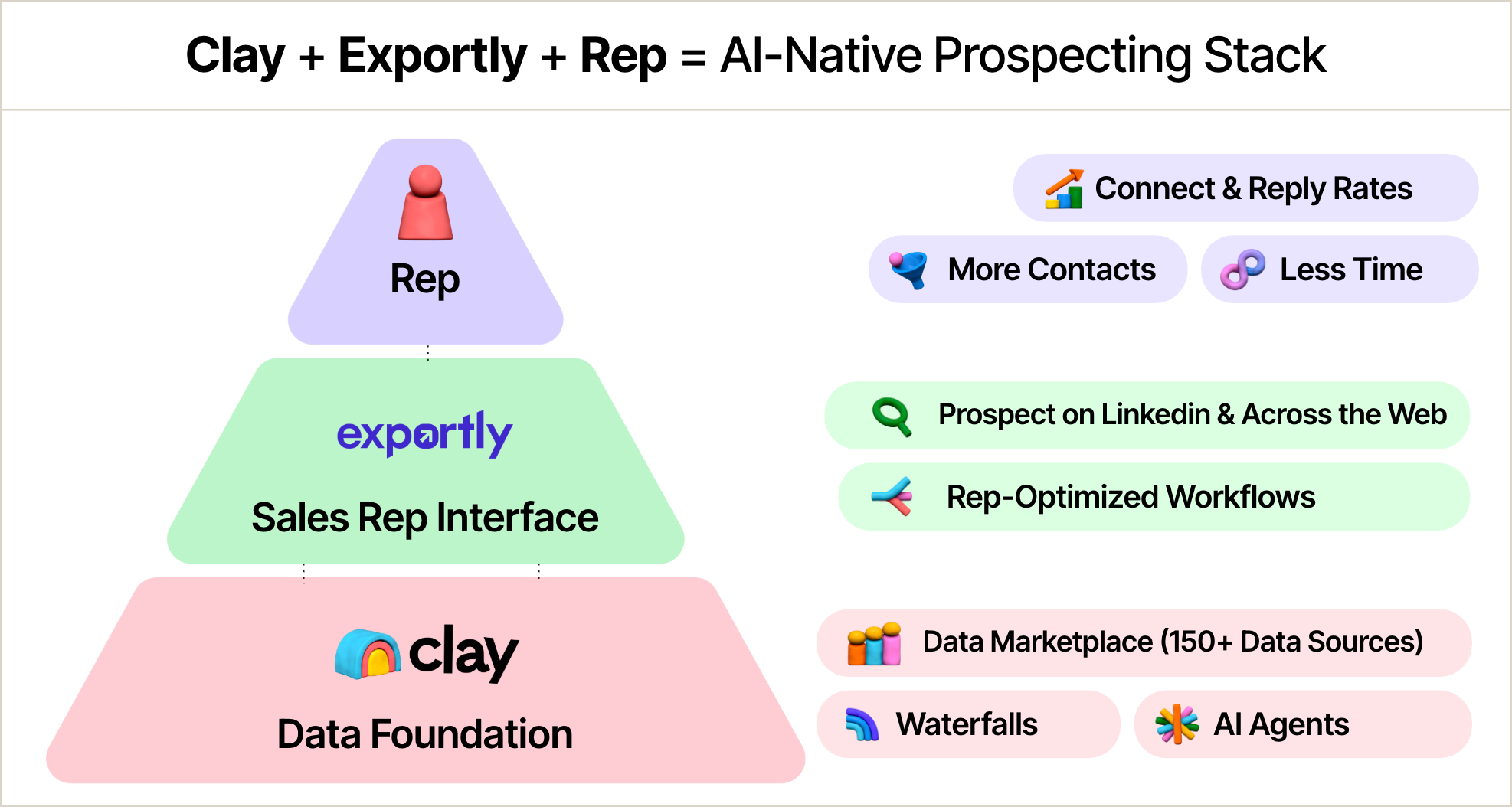
With ZoomInfo, you get the workflow ZoomInfo decided to build.
With Clay and Exportly, you get the workflow your GTM team decides to build.
That is a very different operating model.
Consolidate or compose
Most ZoomInfo replacement content pushes one of two arguments.
The first is consolidation:
Replace ZoomInfo plus Outreach plus deliverability plus social automation with one all-in-one platform.
That argument is compelling for teams whose stack is fragmented, underused, and expensive.
The second is unbundling:
Stop paying for the parts of ZoomInfo you do not use. Keep the tools your reps already like and replace the data & workflow layer.
That argument is compelling for teams that already have Salesforce or HubSpot, already have Outreach, Salesloft, Gong Engage, or Apollo, and already use Clay as the enrichment brain.
Clay plus Exportly belongs to the second camp, but with an important twist.
You are not just unbundling the contact database you bought from ZoomInfo. You are making the workflows programmable and therefore customizable.
Replace the rigid data-and-export motion with Clay workflows that can be exposed to reps through Exportly.
What you are actually replacing
Most teams say they use ZoomInfo for contact data.
That is only partially true.
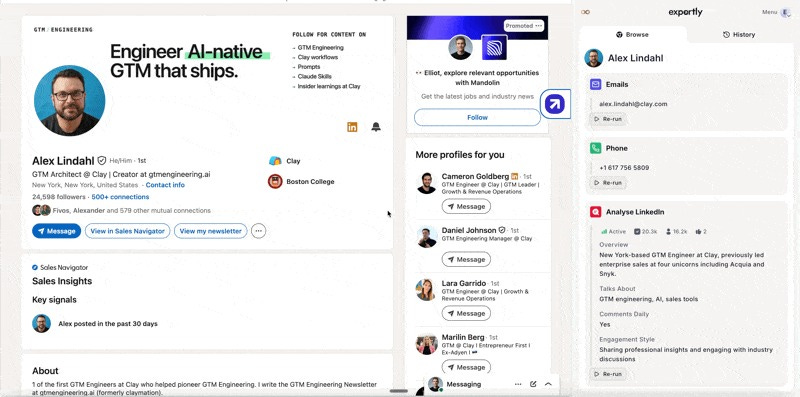
In practice, ZoomInfo usually handles five jobs:
It gives reps a familiar place to get data.
It provides email and phone enrichment.
It moves records into Salesforce, HubSpot, Outreach, Salesloft, Gong Engage, Apollo, or wherever the next action happens.
It creates a sense of autonomy for reps.
It creates contract gravity because ZoomInfo feels like the safe default.
The first four are workflow problems.
The fifth is a change-management problem.
That distinction matters. If the replacement forces reps into an admin-heavy workspace, adoption will suffer. If it gives them better data but breaks CRM matching, RevOps will not trust it. If it saves money but removes rep autonomy, sales will feel like it lost a tool.
The winning replacement needs to preserve the surface area reps expect while giving the business more control underneath.
The replacement architecture
The cleanest way to replace ZoomInfo is to separate the old product into layers.
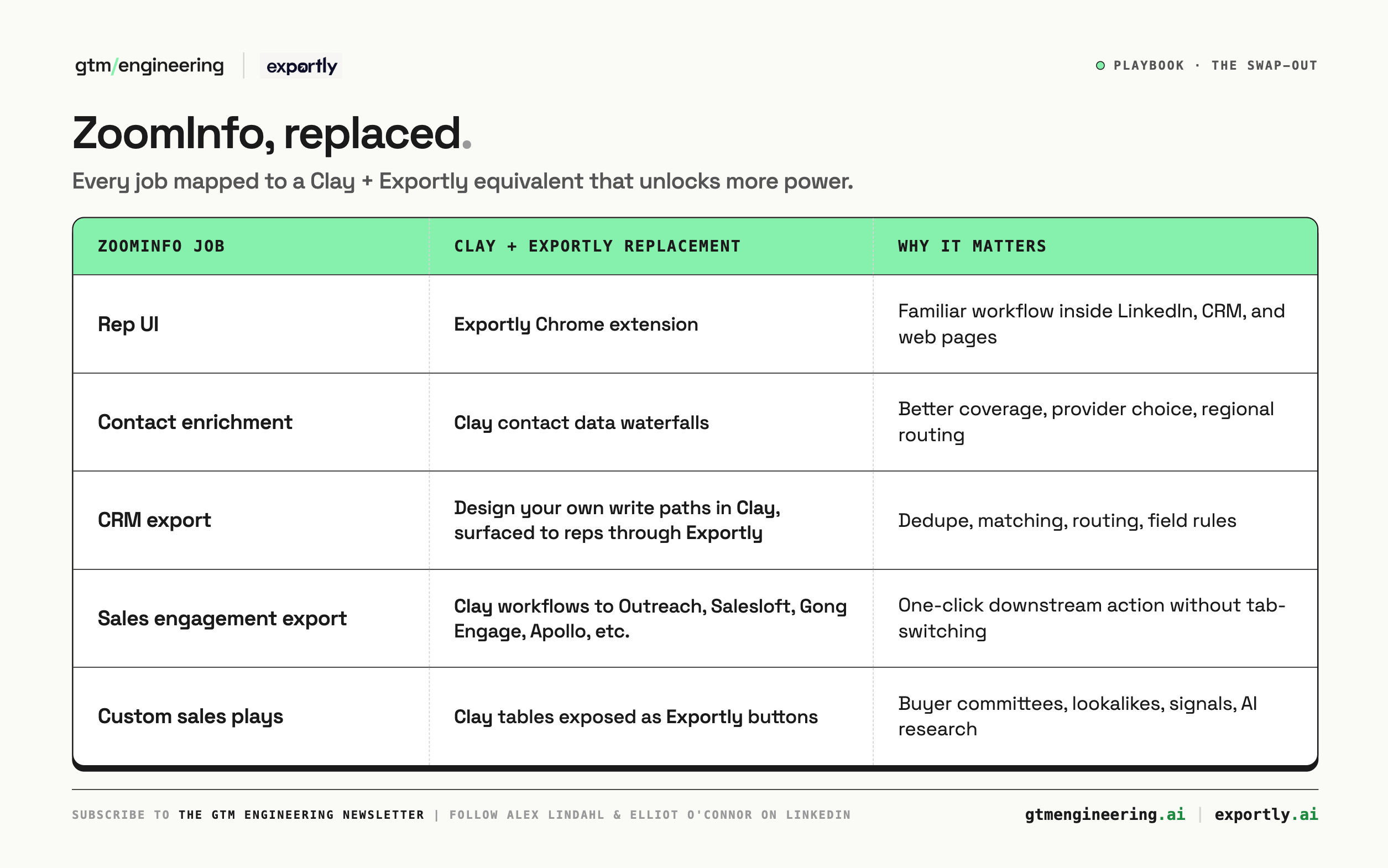
The rep experiences a familiar UI to run any sales play they want.
RevOps gets to design those sales plays and iterate them with feedback.
That is the unlock.
How it works
What we’ve learned from migrations
1. Data quality is important, but data validity is the better frame.
“More data” is not always the goal.
Savvy GTM teams are asking:
Did we find a usable email?
Did we validate it?
Did the phone connect?
Did the record land in the right account?
Did we avoid a duplicate?
Did the rep get to the next action faster?
This matters because ZoomInfo can still be strong in certain slices, especially North American phone data. You should be honest about that.
Do not walk into the replacement project with a religious argument.
Run the test.
Take 200 to 500 representative contacts across your key segments and regions. Include known-good contacts, stale CRM contacts, newly hired prospects, small companies, large enterprises, and the regions where your reps complain most about coverage.
Compare valid email coverage, mobile/direct-dial coverage, connect rate, bounce rate, CRM match rate, duplicate rate, cost per usable contact, and time from selection to sequence.
The winning system is not the one that fills the most cells.
The winning system is the one that creates the most usable downstream records.
2. CRM sync is harder than it looks.
Almost every buyer eventually gets to the same question:
Can my reps get this person from the web into my CRM without creating a mess?
This is where Clay and Exportly should win.
Because the export passes through Clay first, the team can define real business logic before the record touches CRM:
Match to the correct account.
Check whether the person already exists as a lead or contact.
Decide whether to create, update, or block the action.
Respect do-not-contact status.
Prevent protected field overwrites.
Add the right source, sequence, owner, territory, creator, and timestamp.
Route to Salesforce or HubSpot first, then to the sales engagement tool.
That is not just enrichment.
That is GTM infrastructure.
3. You do not need a big-bang migration.
One of the strongest ideas from teams already moving from ZoomInfo to Clay is this:
You can start before the ZoomInfo contract ends.
If you still have ZoomInfo access, use it during the transition. In many setups, ZoomInfo data can be pulled into Clay while Clay starts doing what it does best: enriching gaps, validating records, running alternate waterfalls, and writing clean updates back into Salesforce or HubSpot.
Instead of:
We are turning off ZoomInfo and hoping the new workflow works.
You get:
We are running both systems in parallel, measuring where Clay adds coverage, and gradually moving reps onto the better workflow.
Parallel migration is how you turn a scary replacement into a measured rollout.
The 30-day migration playbook
Before you build anything, find the contract.
TIP: ZoomInfo is notorious for having different non-renewal notification dates than others. They’re usually 2 months in advance, and non-forgiving if you miss it.
You need the renewal date, cancellation notice window, required notice format, current seat count, paid modules, data export rules, and API access. Set reminders well before the notice deadline. The migration clock starts months before the contract ends.
Then compress the rollout into five moves:
1. Audit the real usage
Do not start with vendor comparison. Start with behavior.
Which teams use ZoomInfo? How much usage is Chrome extension lookup? How much usage is list building? Which destinations matter? Which workflows must exist on day one?
Most teams find the replacement surface is smaller than the contract surface.
That is good news.
2. Build the benchmark
Run the same representative records through ZoomInfo and your Clay waterfalls.
Measure the outputs that matter: valid email, connected phone, CRM match, duplicate avoided, record sequenced, and cost per usable record.
Use the results to create a one-page business case:
Where ZoomInfo still wins
Where Clay plus Exportly wins
Recommended rollout path
3. Pilot with champions, make them heroes
Pick a small group: a few power users, one manager, one RevOps owner, and one Clay/admin owner. Ideally the sellers are some of your top performers. This makes it much easier to ‘sell’ to the rest of the team and highlight them as examples.
Give them a narrow job:
Use Exportly instead of ZoomInfo for the core daily workflow for 5 business days.
Track active usage, enrichments, successful CRM writes, duplicate rate, sequence adds, credit usage, valid email rate, phone coverage, and rep feedback.
4. Incorporate feedback & ship new workflows
Make the reps feel part of the process. Include them in iteration process of building custom workflows that they help design.
Make sure the champion group is super happy before moving to the next group.
The best outcomes happen when you provide workflows that weren’t possible before. The system becomes more exciting and viewed more than just a replacement.
You’ll probably want another 5 business days of testing and iteration.
5. Roll out sequentially to other teams
Include enablement and ops as part of the process.
Keep building trust with reps as you roll-out Exportly from group to group.
Also realize that different teams will have different workflow needs. Enterprise sellers work uniquely compared to velocity/SMB reps.
The objections
“ZoomInfo has great phone data.”
Sometimes it does, especially in North America.
So test it. Build regional waterfalls. Tune provider order. Compare by segment. If needed, keep a fallback for a specific use case while you migrate the broader workflow.
The honest answer builds trust.
“Reps will not use Clay.”
Correct.
Most reps should not have to.
Clay is the builder interface.
Exportly is the seller interface.
“Credits will get out of control.”
They can if you do not design controls.
Use export limits, table limits, waterfall skips, and reporting.
Good credit governance is one of the benefits of moving to Clay.
Legacy to modern
ZoomInfo belongs to the old GTM tooling era:
One vendor. One database. One interface. One set of product decisions applied to every customer.
Clay and Exportly belong to the new GTM engineering era:
Composable data. Programmable workflows. Company-specific logic. Continuous optimization.
Once the data layer is programmable and the rep interface can surface any approved workflow, the sales team is no longer limited to “get phone” and “export contact.”
You can give reps buttons like:
Find the buying committee for this account.
Check whether this person matches our ICP.
Refresh this stale Salesforce contact.
Find lookalike companies.
Pull recent hiring signals.
That is the real reason to replace ZoomInfo.
Not just to lower cost.
Not just to improve data.
But to turn a static lookup tool into a programmable GTM system.
The bottom line
ZoomInfo gave sales teams an interface to query a database.
That interface gave reps autonomy.
But the next generation of GTM teams need more than a database with a few static workflows layered on top. They need an interface connected to their own logic, their own CRM rules, their own waterfalls, their own ICP, their own territories, and their own plays.
That is what Clay and Exportly make possible.
The goal is not to rebuild ZoomInfo.
The goal is to replace it with something more programmable.
Whoever owns the workflow owns the GTM system.
Get started with Exportly: www.exportly.ai
Get started with Clay: www.clay.com
GTM Engineering jobs of the week
Equinix is hiring 3 different types of GTM Engineers.
What makes Equinix interesting?
You're at the epicenter of the AI infrastructure wave
Equinix is in the early chapters of what they describe as a multiyear infrastructure investment cycle — arguing that just like the internet three decades ago, AI is a catalyst for a fundamentally new approach to how enterprises connect and orchestrate technology workloads. The financials back it up. Q1 2026 revenues hit $2.44 billion, a 10% increase year-over-year, with operating income up 26%, and the 2026 outlook projects revenue between $10.1–10.2 billion with margin expansion.
The AI product surface is expanding fast
In September 2025, Equinix unveiled its Distributed AI infrastructure solution — including a new AI-ready backbone, a global AI Solutions Lab, and Equinix Fabric Intelligence to support inferencing workloads — with key partnerships spanning Adobe, Dell, Groq, HPE, NVIDIA, Zayo, and Zoom. If you work in solutions, engineering, partnerships, or GTM, you're selling and building something that didn't exist two years ago.
GTM Engineer: Revenue Acceleration [$136k - $245k]
Responsibilities mentioned:
Build deal signal detection and next-best-action systems that surface the right insight for AEs at the right moment in the deal cycle, from early qualification through close
Serve as the builder for ideas that originate in the field -- when sellers, marketers, or customer success managers identify an opportunity but lack the technical depth to execute on it, you turn their insight into a production-ready solution on their behalf
Run data-driven experiments on GTM workflows and automations, measure impact against pipeline and conversion metrics, and scale what works into durable infrastructure
GTM Engineer: Pipeline and Revenue Generation [$136k - $245k]
Responsibilities mentioned:
Build AI-powered prospecting and outbound personalization systems that help SDRs engage the right accounts at the right time, without the manual research overhead
Develop intelligent inbound lead scoring, routing, and response automation that reduces friction between a prospect’s first signal and their first conversation with a rep
GTM Engineer: Customer Experience & Lifecycle [$136k - $245k]
Responsibilities mentioned:
Develop onboarding and adoption automation that accelerates time-to-value for new customers and reduces manual coordination across Customer Success and delivery teams
Create intelligent support routing, case deflection, and delivery workflow automation that frees teams from administrative overhead and surfaces escalation risks before they become problems

Great post! I have been looking for this solution for a chrome extension. This will allow me to cancel my Apollo subscription. Do you know when exportly will be available? I signed up to request access but haven’t heard back.