New here? Hi, I’m Alex Lindahl, Creator in Residence at Clay.
Join 8,700+ GTM operators from OpenAI, Reddit, a16z, Figma and others who subscribe to build better AI-native GTM systems.
Diogo Almeida, the co-inventor of ChatGPT, left OpenAI 2 years ago to answer 1 question:
If these models are so intelligent, why have they automated so little of the world’s work?
He’s been building in stealth for 2 years and just announced Jev, a new type of model from his company, TypeSafe.ai. Jev gives AI the properties of code. Their mission is to:
Pave the shortest path to an AI-based economic revolution² by making intelligence composable to catalyze a Cambrian explosion³ of intelligent software.
It’s a big deal for GTM (and for building in Clay). This is what you need to know using it in GTM:
What is Jev
The difference between Jev and an LLM
Why it’s important that AI has properties of code
Why Jev works so well for GTM workflows
When to use Jev vs. Claygent or a formula column
A step by step guide for setting up Jev
Where to dive in for more
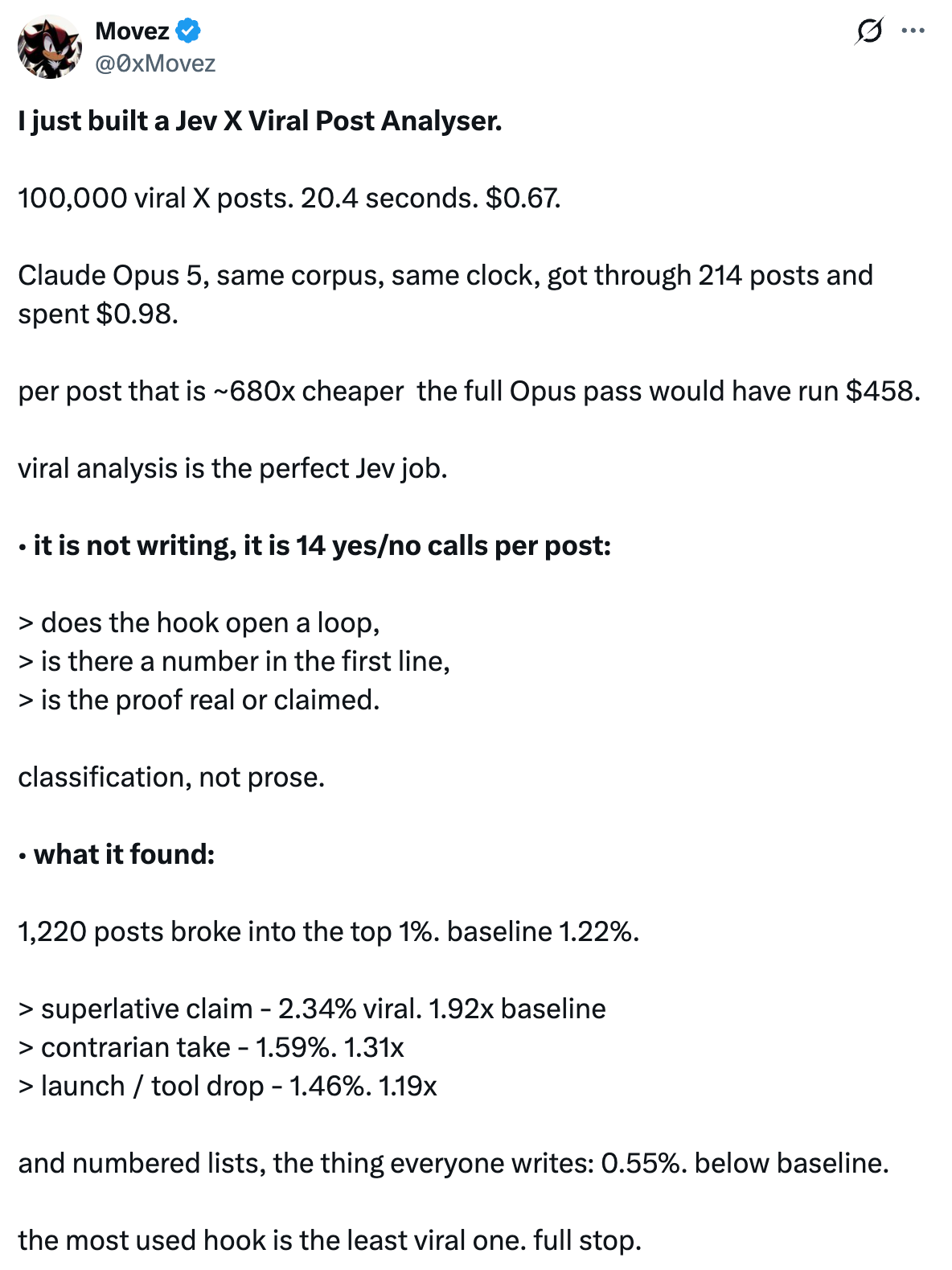
If you’re on X, there’s some insane demos that showcase speed like this viral x post analyzer (from 0xMovez AI):
Jev for GTM & Clay
You can think of Jev like this:
Jev is like a bouncer checking IDs at the door: fast, cheap, and only capable of yes/no/which-bucket judgments against a fixed set of criteria. An LLM is like the bartender who can actually hold a conversation, improvise a drink recommendation, and explain their reasoning — much more capable, but far slower and pricier for a job that's really just "check the ID and let them in or don't."
What is Jev?
Jev is a model from TypeSafe AI and calls it a “System One” model, after Kahneman’s split between fast, intuitive judgment (System 1) and slow, deliberate reasoning (System 2). LLMs are built to think out loud. Jev is built to make the call.
It can’t write anything. You give it some text (TypeSafe calls this the state) and a set of questions. It returns typed answers. There are three question types:
Choice. Pick one option from a list of up to 255. You get back the pick, a probability for every option, and a confidence score.
Score. Rate something on a scale of 2 to 10 levels you define. You get back a score, the probability for each level, and confidence.
Noul. A yes/no question answered as a single probability between 0 and 1.
You can ask several questions in one API call, and Jev answers each one separately and in parallel. One row can get a persona label, an ICP score and a buying-signal check from a single request.
There’s a ton of situations GTM (and its systems) where you just need judgement calls instead of generating a brief, email, landing page, or something else.
How is Jev different from an LLM
The obvious difference is output. An LLM gives you a string you then have to parse. Jev gives you "choice": "investor" and "confidence": 0.91. There’s nothing to clean up.
The less obvious difference is how it produces that answer. An LLM generates one token at a time, each based on the tokens before it. Jev produces its answers all at once. TypeSafe trained it with a method it calls Reinforcement Learning for Calibrated Decisions (RLCD). The idea is that when Jev says 0.8, it’s right about 80% of the time.
Speed and cost improvements are useless unless the confidence score is reliable.
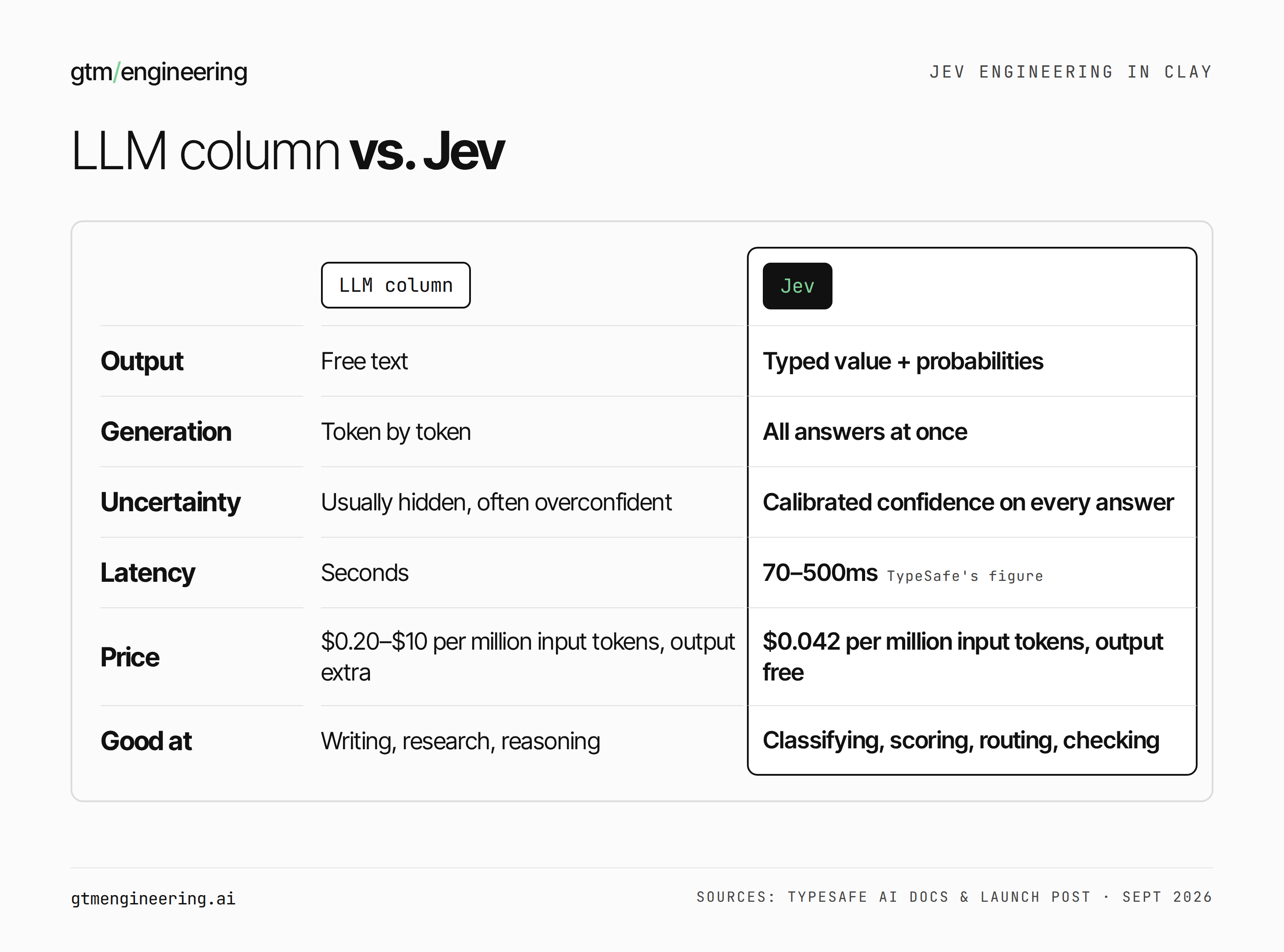
Some caveats before anyone quotes the headline numbers. TypeSafe’s site says Jev is 193x faster and 445x cheaper than frontier LLMs, and that hallucination is “mathematically impossible”. Those numbers come from TypeSafe’s own tests, and the company’s launch post says they’re “on the higher end of real world gains.” The no-hallucination claim is narrower than it sounds. Jev can’t invent facts because it can only pick from options you wrote. It can still pick the wrong one. It reads wording literally. And its context window is capped at 64k tokens. TypeSafe also says that giving it more context can make it less accurate, which matters a lot in Clay, where every row carries a pile of enrichment data.
So Jev isn’t a replacement for your LLM columns. It goes next to them. The LLM writes. Jev decides.
Why Jev works well in GTM & Clay
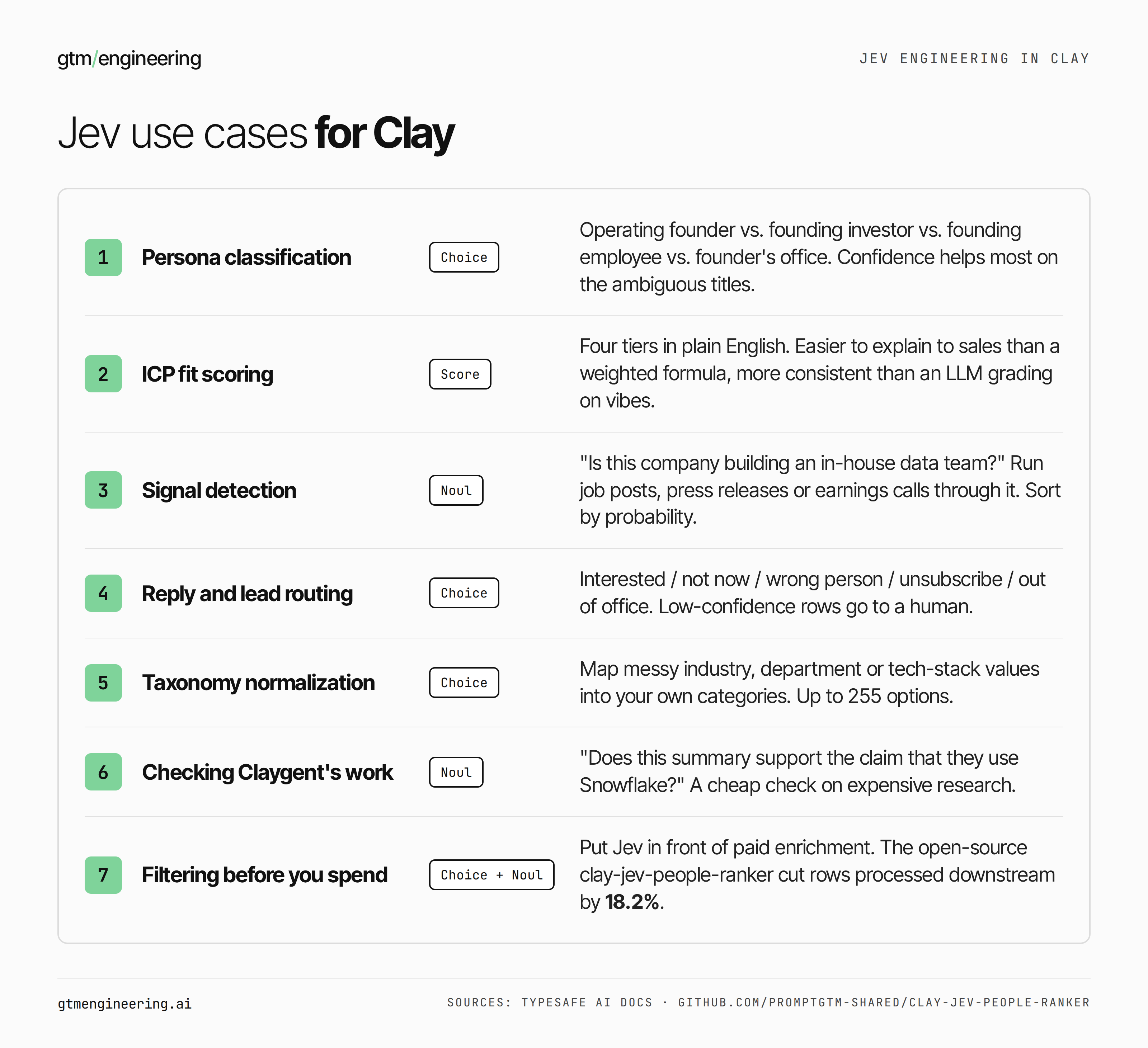
Look at what a typical Clay table actually does. Very little of it is writing. Most of it is small judgment calls, repeated tens of thousands of times:
Is this title a buyer? Is this company in our ICP? Is this job post a hiring signal for our product? Is this reply a “not now” or a “never”? Which of our 40 industry buckets does this company belong in?
Each one needs judgment (a lookup won’t work) but produces a label, a number or a yes/no. It has to come out the same way on row 1 and row 40,000, and in a format the next column can use. That’s the job Jev was built for.
The use cases I’d start with
Think of it this way: anything that needs classification, scoring, routing, or filtering. We do a lot of that in Clay and this is where Jev will accelerate and reduce the cost of workflows or table builds.
Which tool for which job in Clay
My rule of thumb when I’m building a workflow or table:
A deterministic rule works (domain matches, headcount > 50) → formula or lookup. Don’t pay a model for arithmetic.
It needs judgment, and the answer is a label, a score or a yes/no → Jev.
It needs writing: an opener, a summary, an email → an LLM column.
It needs the web or several research steps → Claygent.
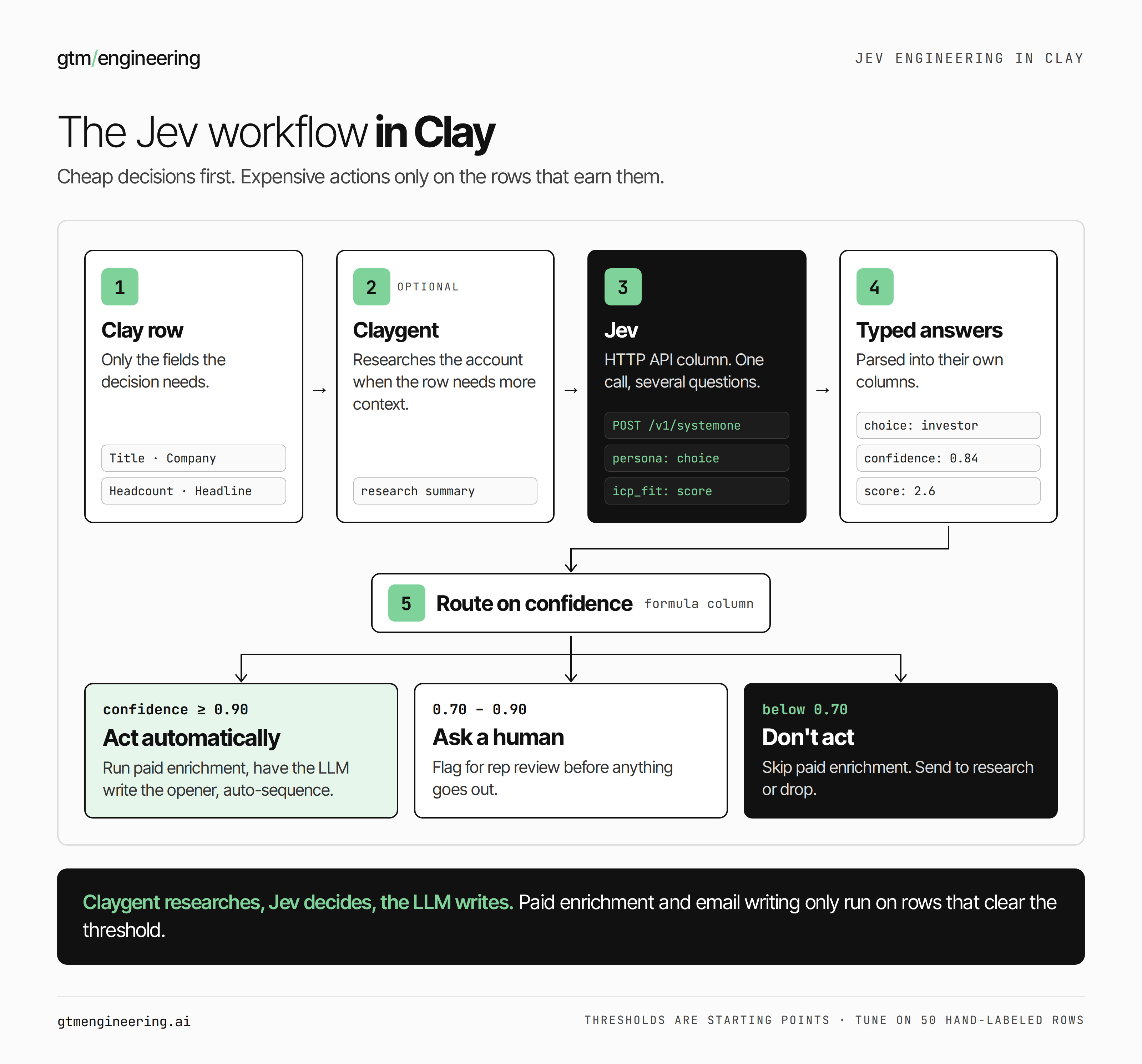
I now chain my workflows in the following way:
Claygent researches
Jev decides
LLM writes, but only for rows that cleared Jev’s threshold.
How to setup Jev in Clay
Clay has no native Jev integration yet, so we'll use the HTTP API column. It takes about ten minutes.
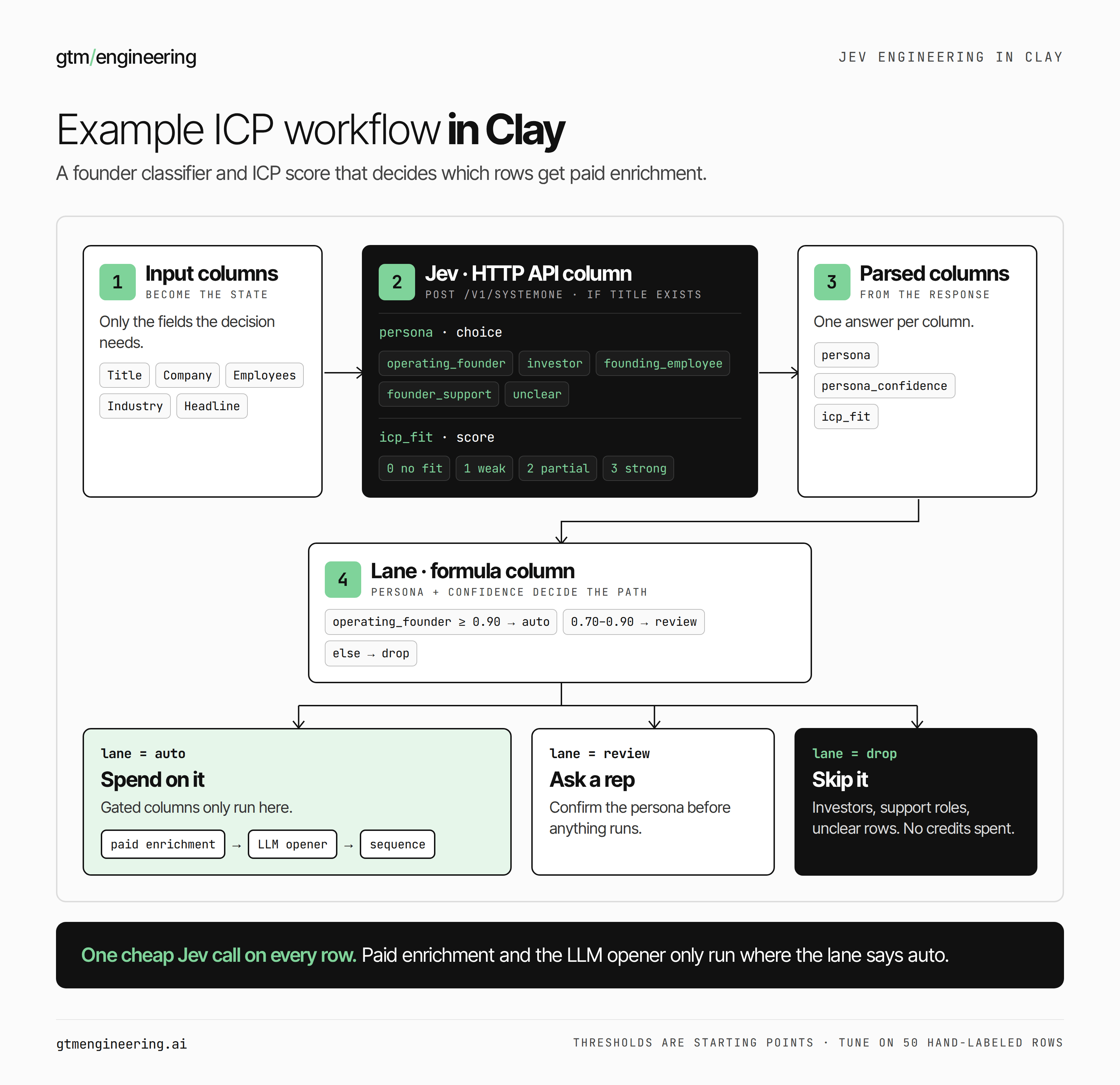
1. Get an API key. Sign up at console.typesafe.ai (it’s in early access at the time of writing) and create a key under Keys. Before you touch Clay, paste a few sample rows into TypeSafe’s Playground and tune your questions there. Iterating is much faster outside a table.
2. Add an HTTP API column to your Clay table.
Method:
POSTEndpoint:
https://api.typesafe.ai/v1/systemone
3. Add headers.
Authorization: Bearer YOUR_TYPESAFE_API_KEY
Content-Type: application/json
4. Write the body. state is the text Jev reads, built by inserting your Clay columns. questions is where you define the decisions. Here’s a persona classifier and ICP score in one call (swap the {{ }} placeholders for your actual columns using Clay’s column picker):
{
  "model": "jev-latest",
  "state": "Name: {{Full Name}}. Title: {{Job Title}}. Company: {{Company Name}}. Employees: {{Employee Count}}. Industry: {{Industry}}. Headline: {{LinkedIn Headline}}",
  "questions": {
    "persona": {
      "type": "choice",
      "instructions": "What is this person's current role relative to the company?",
      "criteria": {
        "operating_founder": "Founded the company and currently runs it day to day",
        "investor": "Investor or board member, not an operator",
        "founding_employee": "Early employee who did not found the company",
        "founder_support": "Founder's office, chief of staff, or executive assistant",
        "unclear": "Not enough information to tell"
      }
    },
    "icp_fit": {
      "type": "score",
      "instructions": "How well does this company fit our ICP: B2B software, 50 to 500 employees, selling to technical buyers?",
      "criteria": [
        "No fit",
        "Weak fit: one criterion met",
        "Partial fit: two criteria met",
        "Strong fit: all criteria met"
      ]
    }
  }
}
Two things worth noticing. state is short and labeled: only the fields the decision needs, not the whole enrichment blob. And the persona question has an unclear option. Without it, Jev has to pick one of the real options even when the data is thin.
5. Parse the response. You'll get something like:
{
  "answers": {
    "persona": {
      "choice": "investor",
      "probabilities": {
        "operating_founder": 0.06,
        "investor": 0.88,
        "founding_employee": 0.02,
        "founder_support": 0.01,
        "unclear": 0.03
      },
      "confidence": 0.84
    },
    "icp_fit": {
      "score": 2.6,
      "probabilities": [0.02, 0.08, 0.2, 0.7],
      "confidence": 0.62
    }
  }
}
Extract answers.persona.choice, answers.persona.confidence and answers.icp_fit.score into their own columns. Note that Score returns a weighted average (2.6 here), not a whole number, so round it or bucket it if your team wants tiers.
6. Turn confidence into action. Add a formula column that sorts every row into one of three lanes. TypeSafe’s own guidance is that “a confidence threshold is not one number,” and they’re right. Set a stricter threshold for actions that are hard to undo:
confidence ≥ 0.90→ auto-enroll in a sequence0.70–0.90→ flag for rep review< 0.70→ don’t act; send to research or drop
The clay-jev-people-ranker repo uses 0.90 for “current founder” and 0.80 for “operating founder.” That’s a reasonable starting point.
7. Add run conditions. Only run the Jev column when the fields it needs aren’t empty. Then gate your expensive columns (paid enrichment, LLM email writing) on the lane column. This step is where you save money.
8. Handle errors. A 429 means you hit TypeSafe’s rate limit and a 529 means their service is overloaded, so lower Clay’s request rate on the column and let it retry. A 422 almost always means malformed JSON. The usual cause is a quote mark or line break inside a merged field, like a LinkedIn headline with " in it.
Don’t run 20,000 rows on the first try. Run 50. Label 20 of them yourself and compare.
When Jev gets one wrong, look at the probabilities, not just the pick. If the right answer came in second at 0.35, your criteria are overlapping or vaguely worded. Rewrite the criteria before you touch anything else. Nine times out of ten the fix is in the criteria.
And resist the urge to add context. When accuracy dips, the instinct is to add more fields to state. TypeSafe’s guidance runs the other way. Cut state to what a smart human would need to make the call, and test again.
A common mistake
Criteria that overlap (”Enterprise” and “Large company”). No “unclear” option. One confidence threshold for everything. Pasting a whole enrichment payload into state. Asking Jev to write a first line. It can’t.
What it costs
At TypeSafe’s published rate of $0.042 per million input tokens, a request like the one above (around 300 input tokens) costs about $0.0000126 a row. That’s roughly $1.26 per 100,000 rows in API cost.
[FILL IN: the same classification run through a Clay “Use AI” column on a mid-tier model costs ___ credits per row, or about $___ per 100k rows.]
[VERIFY: whether Clay charges credits for HTTP API columns that use your own key.]
Even if the real-world gap is a fraction of TypeSafe’s headline numbers, classification stops being a line item worth thinking about. The bigger saving is indirect: everything you don’t run on rows Jev filtered out.
When not to use Jev
When the output is words. When the answer needs the web. When the task takes several reasoning steps. And when you can’t write down clear criteria for the decision: if you can’t explain the difference between “Partial fit” and “Strong fit” to a new SDR, Jev can’t learn it from you either. That’s a problem with your ICP definition, not with the model.
Another example workflow
Want to go deeper?
If you want to go deeper, I'm building an interactive course on using Jev for GTM engineers who code a little. It's on uare.ai (where I’m building my personal AI you can chat with.): Jev for GTM Engineers: Structured Decisions Without the LLM Tax
This is a pretty cool new service. The course includes an interactive AI, which is trained on me. Check out the interview on Personal AI with their founder, Robert LoCascio, who previously founded LivePerson and brought them public with $500M ARR.
You can also find more Jev Cookbooks here.